Free App to Track Driving Hours for Permit
Automatically track supervised driving hours for your learner’s permit without manually starting or stopping a timer. Log day and night driving hours, miles, weather, and road types in one place.
Review your practice drives and export a free PDF driving log when preparing for your driver's license.

How to Track Driving Hours for a Permit
OtoZen helps student drivers automatically track supervised driving hours for a learner's permit without relying on paper logs or manually starting a timer. Start by checking your state's required practice hours, then follow these four simple steps.
Enable Student Driver Mode
Open OtoZen, go to Short Cuts, and enable the Licensing Log feature before starting your supervised driving practice
Automatically Record Practice Drives
Complete your supervised practice drives while OtoZen automatically records your driving activity in the background.
Review Your Permit Driving Hours
Review the trips that count toward your permit requirements, including total driving time, day and night hours, miles, and driving conditions.
Export Your Driving Log
Export your student driving log as a PDF. Check your state's required driving hours, accepted forms, and signatures before submitting your log.
TRACK EVERY PRACTICE DRIVE
Track Driving Hours for Free
Automatically log permit driving hours and export a free PDF.
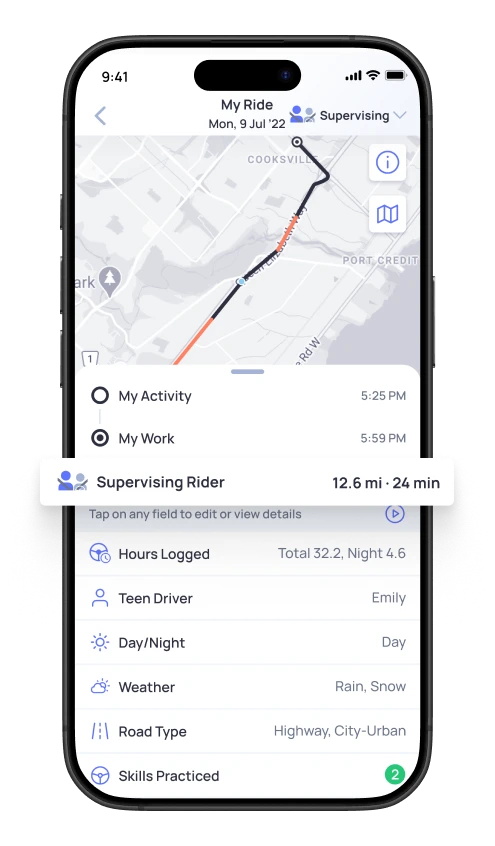
Automatic Driving Log App for Permit Hours
OtoZen’s automatic trip logging records student driver practice drives in the background. Families can review trips, choose the drives that count, and keep a cleaner driving-hours log.
No need to manually start and stop every practice trip.
Review driving time, miles, and night-driving progress.
Keep supervised driving practice organized in one place.
Automatic Driving Log vs Manual Driving Log
A paper log can work, but it is easy to forget trip details after practice. OtoZen helps families keep permit driving hours organized automatically.
Good, but easy to forget
Manual driving logs depend on the student driver or parent remembering every trip detail after each practice drive.
- Start and end times must be entered manually.
- Miles and night-driving time can be missed.
- Weather, road type, and practice details may be forgotten.
- Paper logs can be hard to organize before a DMV visit.
Easier for busy families
OtoZen automatically records practice drives, so families can review the details later and prepare a cleaner driving-hours log.
- Practice drives are logged automatically in the background.
- Driving time, miles, and day/night details are easier to review.
- Weather, road type, and trip history stay organized.
- Families can export a DMV-ready PDF when needed.
What Counts Toward Permit Driving Hours?
Permit driving-hour rules depend on your state. Many states ask families to track supervised driving time, and some require a separate number of night-driving hours.
Total supervised driving time
Day and night driving hours
Miles driven, date, and trip time
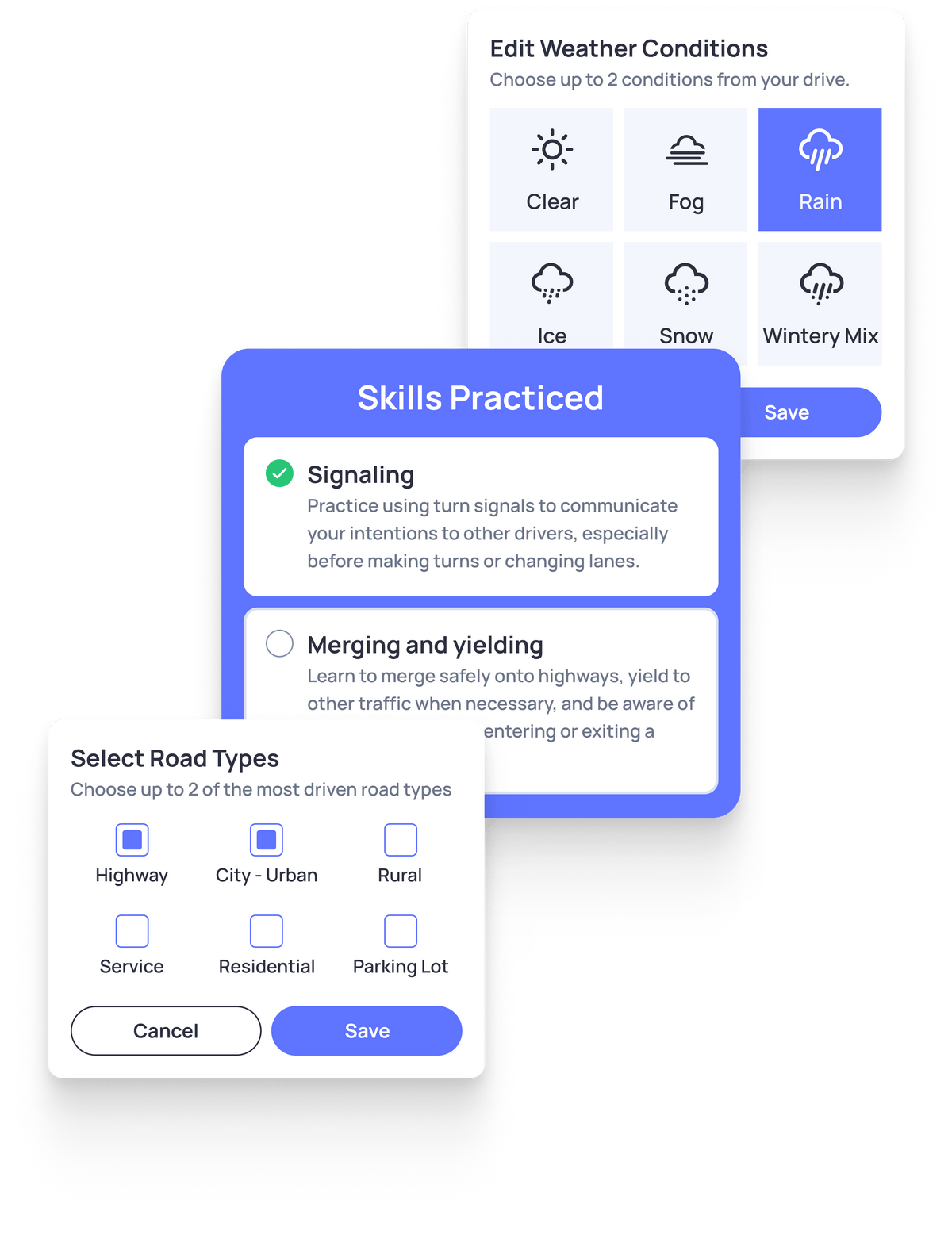
Road type, weather, and practiced skills
What OtoZen Tracks Automatically
OtoZen helps student drivers and supervising parents keep important permit-driving details in one place.
Driving time
Track supervised practice time so families can review progress toward permit or license requirements.
Day and night hours
Separate day and night driving details, which helps families review required practice hours more easily.
Miles and road type
Keep trip distance and road-type details organized for a clearer student driving log.
Weather conditions
Add helpful context about weather and driving conditions during supervised practice drives.
Practice details
Review trip history and driving details so parents can guide safer practice over time.
PDF export
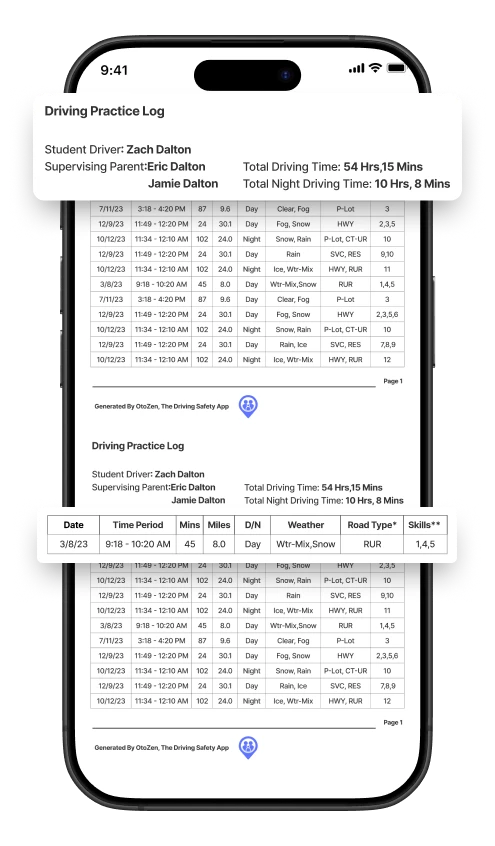
Export a DMV-ready driving log that families can review, print, and prepare for submission.
How to Export a DMV-Ready Driving Log
Turn your automatically recorded practice drives into an organized PDF driving log. Review your supervised driving hours and prepare your records for your driver's license or road test.
Review recorded practice drives and total driving hours.
Check daytime and nighttime driving hours.
Export, save, or print your PDF driving log for free.
State Requirement Reminder: Verify With Your Local DMV
Driving-hour requirements are not the same in every state. OtoZen helps families organize permit-driving details, but your local DMV or licensing agency is the final source for required hours, forms, signatures, and submission rules.
Before submitting your student driving log, check your state’s official DMV or licensing website to confirm what is required.
More OtoZen Safety Features for New Drivers
Know Your New Driver Is Safe
See live location, ETA, speed, and arrival updates during every drive. OtoZen helps parents feel informed without calling or texting while their child is on the road. Live Location Sharing and Tracking

Help Them Slow Down in Time
OtoZen gives real-time speeding alerts when a driver goes over the speed limit. Gentle reminders help new drivers build safer habits on every trip.

Reduce Phone Use While Driving
OtoZen helps remind new drivers to keep their attention on the road. When phone handling is detected during a drive, the app sends a gentle warning. Avoid texting and driving.

Understand Their Driving Habits
Review trip summaries, drive score, speeding, phone use, and trip history. OtoZen helps parents guide safer driving conversations with more clarity.

What Users Are Saying
Apple and Google App Store Reviews
Get Started in Minutes

Download the OtoZen App

Invite family members
They download the App

Your family is protected
Answers To Your OtoZen Questions
OtoZen is a free app for tracking supervised driving hours for a learner’s permit in the USA. It automatically records driving time, day and night hours, miles, weather, road type, and trip history. Students and parents can review practice drives and export a PDF driving log without manually recording every trip.
You can track driving hours manually with a paper log, spreadsheet, or app. OtoZen makes it easier by automatically logging practice drives and organizing important details like time, miles, day or night driving, weather, and road type.
Yes. OtoZen lets you export your student driving log as a PDF for free. You can review your supervised practice drives, save or print your driving log, and prepare your records for your driver’s license or road test. Always verify your state’s accepted log formats and signature requirements before submission.
Yes. OtoZen tracks day and night driving details automatically, which is helpful because many states have separate night-driving requirements for learner’s permit holders.
Yes. DMV and licensing rules vary by state. Always check your local DMV or state licensing agency to confirm the required number of supervised hours, night hours, forms, and signatures before submitting your driving log.
You can also review our DMV driving log guide to understand what families commonly track before checking official state rules.
We recommend both install OtoZen for the easiest setup and review experience. Either party can help review progress and prepare the driving-hours log.
A supervised driving log records practice drives completed by a learner or student driver with a parent, guardian, instructor, or qualified supervising adult. It usually includes the date, driving time, day or night hours, road type, weather, and supervising adult details.
Yes. OtoZen helps families automatically organize supervised driving practice, including driving time, miles, day/night hours, weather, road type, and trip history. Families should still check their state DMV rules before submitting any official form.
Yes. OtoZen’s Student Driver Log is available for free in the USA. You can automatically track supervised driving hours, review practice trips, and export a PDF driving log without a paid subscription for this feature.
No. OtoZen automatically records driving activity in the background when the appropriate Student Driver mode is enabled. You can review your recorded practice drives afterward without manually starting and stopping a timer for every trip.