


Teen Driver Safety App for Parents
Help your teen build safer driving habits with live location, ETA, speed alerts, phone-use warnings, trip reports, and Drive Score — without constant check-ins.

Why Teen Driver Safety Matters for Parents
When a teen starts driving, parents want more than location. They want to know if their teen arrived safely, stayed focused, followed speed limits, and is building safer habits over time.
OtoZen helps parents stay informed with live location, ETA, speed alerts, phone-use warnings, trip reports, and Drive Score, without needing constant calls or texts during the drive.
What Parents Want to Know When Their Teen Starts Driving
- Did my teen arrive safely?
- Are they speeding?
- Are they using the phone while driving?
- What happened during the trip?
- Are their driving habits improving?
- Can we talk about risky driving without arguing?
Simple answers, not constant watching
OtoZen helps answer these questions with live location, ETA, speed alerts, phone-use warnings, trip reports, and Drive Score, so parents can stay informed without constant check-ins.
Teen Driver Monitoring App for Speed, Phone Use, and Trip Reports
OtoZen works as a teen driver monitoring app for parents who want driving context, not constant check-ins.
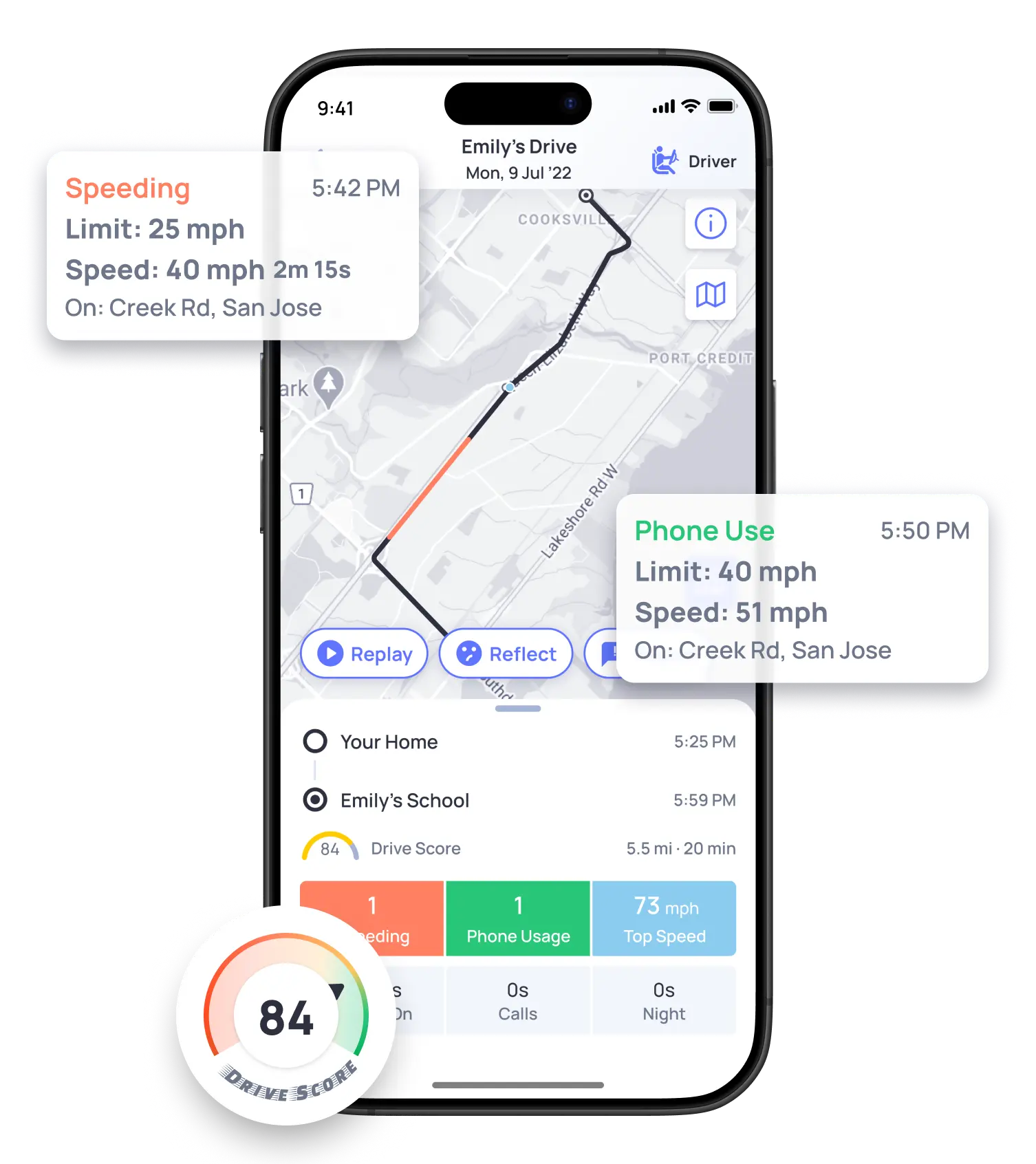
Instead of only showing where a teen is, OtoZen helps parents understand how the drive went. That makes it easier to talk about speeding, phone distraction, late arrivals, and safer driving habits.
What OtoZen Helps Parents Understand
OtoZen connects each safety feature to a real parent question, so families can use driving alerts as helpful context, not constant monitoring.
| Parent Need | OtoZen Feature | Why It Helps |
|---|---|---|
| Know where my teen is | Live location | Reduces “Where are you?” calls and helps parents stay informed. |
| Know when they arrive | ETA and trip progress | Helps parents avoid texting during drives. |
| Understand speeding | Speed alerts and road speed limits | Helps coach safer habits with real driving context. |
| Reduce phone distraction | Phone-use warnings | Reminds drivers to stay focused on the road. |
| Review driving later | Trip reports and Drive Score | Turns alerts into calmer coaching conversations. |
| Protect privacy | Sharing controls | Helps families use tracking with trust and clarity. |
Teen Driver Safety App vs Family Locator App
A family locator app mainly helps parents see where someone is. A teen driver safety app should give more driving context, so parents can understand both where their teen is and how the trip is going.
Basic family locator
Useful for location sharing, but driving safety details may vary by app.
- Live location may be available.
- Arrival updates may vary by app.
- Driving behavior reports may be limited.
- Speed and phone-use context may not be the main focus.
OtoZen teen driver safety
Built for parents who want location, trip progress, and safer-driving insights.
- Live location and ETA during trips.
- Speed alerts and road speed-limit awareness.
- Phone-use warnings while driving.
- Trip reports, Drive Score, and privacy controls.
How to Use Teen Driving Alerts Without Creating Conflict
Teen driving alerts work best when parents use them as coaching tools, not punishment. Before using any monitoring app, explain what the family will review, what alerts matter most, and how the teen can improve over time.
A good rule is to focus on patterns, not one mistake. One speeding alert may start a calm conversation. Repeated alerts may mean it is time to review routes, passengers, phone habits, or driving times.
The goal is not to spy on a teen driver. The goal is to help parents and teens build safer habits together.
What Should Parents Pay For in a Teen Driver Safety App?
When comparing teen driver safety apps, parents should look beyond basic location sharing. The most useful features help families understand driving habits and have better safety conversations.
Live location and ETA
Helps parents know where their teen is and when they may arrive, without repeated calls or texts during the drive.
Speed alerts
Helps parents understand speeding patterns and coach safer habits with real driving context.
Phone-use warnings
Reminds new drivers to stay focused when phone handling is detected during a trip.
Trip reports
Gives parents a calm way to review each drive, including speeding, phone use, and trip history.
Drive Score
Helps families see driving behavior over time and focus on improvement, not just one mistake.
Privacy controls
Helps families use driving safety features with more trust, clarity, and control.
Choose a safety app that helps you coach, not just track.
OtoZen helps parents stay informed, understand driving habits, and guide safer conversations after each trip.
Key OtoZen Features for New Drivers
Know Your New Driver Is Safe
See live location, ETA, speed, and arrival updates during every drive. Feel informed without distracting calls or texts.

Help Them Slow Down in Time
OtoZen gives real-time speeding alerts when a driver goes over the speed limit, helping build safer habits.

Reduce Phone Use While Driving
When phone handling is detected during a drive, OtoZen can send a gentle warning so the driver can refocus.

Understand Their Driving Habits
Review trip summaries, Drive Score, speeding, phone use, and trip history to guide safer conversations.

From our customers
Get Started in Minutes

Download the OtoZen App

Invite family members
They download the App

Your family is protected













Answers To Your OtoZen Questions
The best app to monitor teen driving should show more than location. Parents should look for live location, ETA, speed alerts, phone-use warnings, trip reports, Drive Score, and privacy controls.
Yes. OtoZen can show driving speed, road speed limits, and trip details so parents can better understand driving behavior.
Yes. OtoZen can provide speeding alerts based on driving speed and road speed limits.
OtoZen can detect phone handling during a drive and remind the driver to stay focused.
Yes. A family locator mainly shows where someone is. A teen driver safety app adds driving context such as speed, phone use, trip reports, and driving insights.
Yes. Teen driving apps work best when parents explain what is being shared, why it matters, and how alerts will be used. This helps build trust and turns the app into a coaching tool instead of surprise monitoring.

